

v1.13
Genymobile/scrcpyv1.13Apr 29, 2020by rom1v
AI Summary
Adds orientation locking, display rotation shortcuts, and support for mirroring secondary displays.
Key Highlights
- Lock video orientation option to prevent screen rotation.
- New display rotation shortcuts (Ctrl+Left/Right) to rotate the display only.
- Support for mirroring secondary displays via `--display` flag.
- Trilinear filtering for better visual quality during downscaling.
New Features
- Lock video orientation
- Display rotation shortcuts
- Multi-display support
- Trilinear filtering
- Render driver parameter
- Accept negative window position
Full Release Notes
_To receive a notification on new releases, click on **Watch > Releases only** on the top._ --- **scrcpy v1.13** Changes since v1.12.1: - Add option to lock video orientation (#218, #1151) - Add shortcuts to rotate the display (#218, #1274) - Mirror secondary displays (#397, #898, #1177, #1238) - Enable trilinear filtering when possible (#40, #1284) - Add --render-driver parameter (#1284) - Accept --max-fps before Android 10 (#488) - Accept negative window position (#1242) - Use another local port if 27183 is not available (#945, #951) - Forward NumPad keys when NumLock is disabled (#1188) - Fix issues when directory contains non-ASCII chars on Windows (#1002) - ~Do not print irrelevant workarounds errors (#994)~ - Fix possible BufferUnderflowException on touch event (#1245) - Upgrade FFmpeg to 4.2.2 in Windows releases - Upgrade SDL to 2.0.12 in Windows releases --- # Highlights ## Rotation The previous release (v1.12) added `Ctrl`+`r` to request the device to switch between portrait and landscape. This release adds two additional rotation features, which do not change the device orientation: - an option to lock the video orientation - shortcuts to rotate display at any time ### Lock video orientation The parameter `--lock-video-orientation` changes the mirroring orientation: ```bash scrcpy --lock-video-orientation 0 # natural orientation scrcpy --lock-video-orientation 1 # 90° counterclockwise scrcpy --lock-video-orientation 2 # 180° scrcpy --lock-video-orientation 3 # 90° clockwise ``` The locked orientation affects the recording, and never changes across the session. ### Display rotation New shortcuts are introduced to rotate the display at any time: - `Ctrl`+`←` _(left)_ rotates the display 90° counterclockwise - `Ctrl`+`→` _(right)_ rotates the display 90° clockwise This affects only the display, not the recording. The initial value may also be provided on start via `--rotation`. Possible values are 0, 1, 2 and 3 (having the same meaning as that of `--lock-video-orientation`). ## Multi-display Some devices may expose secondary displays, like Samsung DeX (#397). To mirror them, a new flag `--display` has been added: ``` scrcpy --display 1 ``` ### Limitations The secondary display may only be controlled if the device runs at least Android 10 (otherwise it is mirrored in read-only). Sometimes, mirroring the secondary display just shows a black screen (if some flag called `FLAG_SUPPORTS_PROTECTED_BUFFERS` is set for the display). There is no known solution for now (see discussions #898 and [#1177](https://github.com/Genymobile/scrcpy/pull/1177#issuecomment-590825367)). ## Downscaling quality (trilinear filtering) If the scrcpy window is far smaller (in pixels) than the Android device, visual quality can be very low (#40, #1284). To improve the quality, trilinear filtering is enabled when possible (OpenGL 3.0+ or OpenGL ES 2.0+): 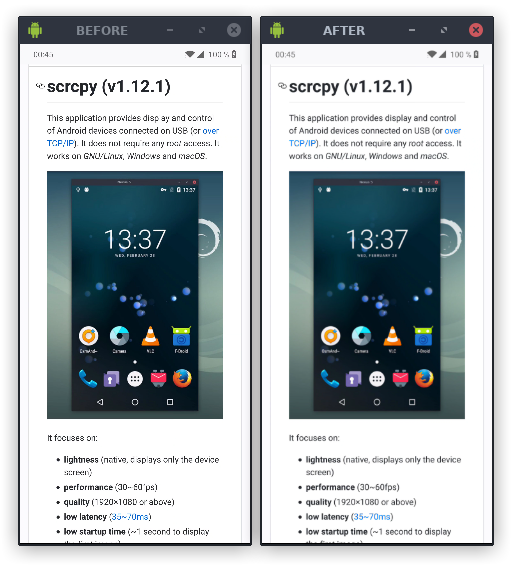 (see [this comment](https://github.com/Genymobile/scrcpy/issues/40#issuecomment-591917787) for more details) Mipmapping is automatically enabled if the rendering is done by OpenGL 3.0+ or OpenGL ES 2.0+. On Windows, you may want to force OpenGL (instead of Direct3D) to benefit from this improvement: ``` scrcpy --render-driver=opengl ``` On macOS, it is not supported (there is no OpenGL 3.0). To force-disable mipmaps even on supported versions of OpenGL, use `--no-mipmaps`.