

v11.O
Notifuse/notifusev11.OOct 8, 2025by pierre-b
AI Summary
Notifuse v11.0 introduces a new Setup Wizard for streamlined onboarding and deployment, making configuration easier through an interactive web interface. Many environment variables (ROOT_EMAIL, API_ENDPOINT, PASETO keys, SMTP settings) are now optional and can be configured via the wizard, while existing installations automatically migrate with no breaking changes.
Key Highlights
- New Setup Wizard provides interactive web-based configuration for first-time installations
- Automatic PASETO key generation during setup wizard
- Database-based configuration storage with environment variables taking precedence
- Several environment variables (ROOT_EMAIL, API_ENDPOINT, SMTP settings, PASETO keys) now optional
- Automatic migration for existing v10.x installations - no breaking changes
New Features
- Setup Wizard - interactive onboarding experience with web-based configuration
- Automatic PASETO key generation with secure display for user records
- Database settings storage in new 'settings' table
- is_installed flag to track setup wizard completion
- Configuration hierarchy: Environment Variables > Database Settings > Default Values
- SMTP configuration via wizard or environment variables
- API endpoint configuration via wizard or environment variables
Full Release Notes
# Notifuse v11.0 Release Notes **Release Date:** October 8, 2025 ## 🎉 What's New ### Setup Wizard for Easy Configuration We're excited to introduce the **Setup Wizard** – a streamlined onboarding experience that makes deploying Notifuse easier than ever before! 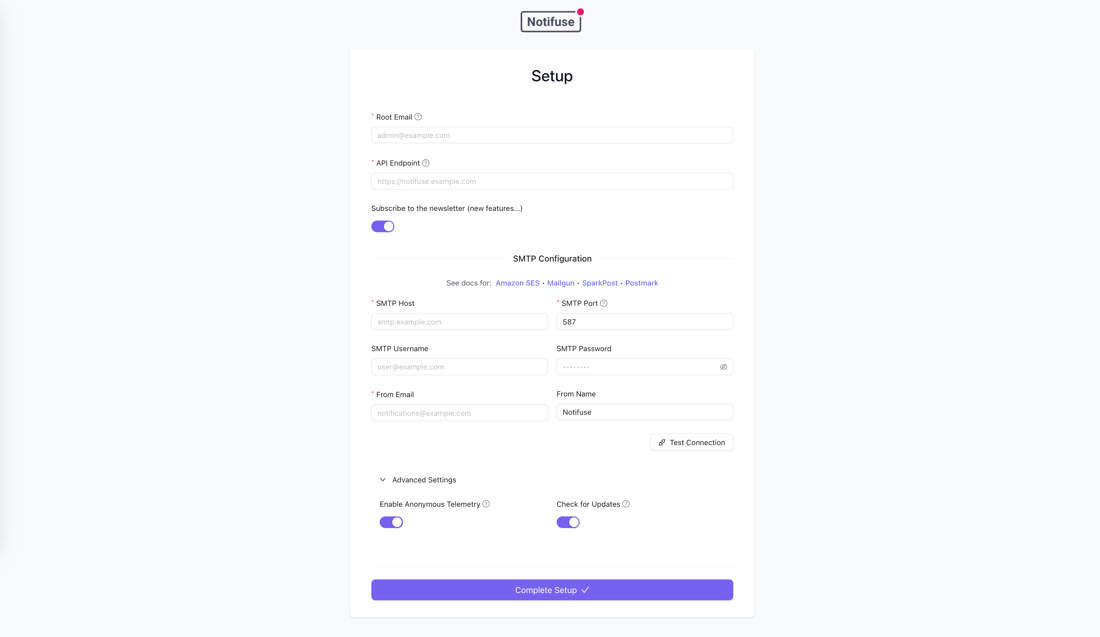 #### Key Features **Simplified Installation** - Interactive setup wizard guides you through initial configuration - No more manual environment variable configuration for first-time installations - Configure your instance directly through the web interface **Automatic PASETO Key Generation** - PASETO encryption keys are automatically generated during setup - Keys are securely displayed at the end of the wizard for your records - No need to manually generate cryptographic keys **Flexible Configuration Management** - Configure via setup wizard and settings are stored securely in the database - Environment variables remain fully supported and **always take precedence** over database settings - Choose the deployment method that works best for your infrastructure **Optional Environment Variables** The following environment variables are now **optional** and can be configured through the setup wizard: - `ROOT_EMAIL` - `API_ENDPOINT` - `PASETO_PRIVATE_KEY` - `PASETO_PUBLIC_KEY` - `SMTP_HOST` - `SMTP_PORT` - `SMTP_USERNAME` - `SMTP_PASSWORD` - `SMTP_FROM_EMAIL` - `SMTP_FROM_NAME` **Required Environment Variables** These environment variables remain **required** for all installations: - `DB_HOST` - PostgreSQL database host - `DB_PORT` - PostgreSQL database port - `DB_USER` - PostgreSQL database username - `DB_PASSWORD` - PostgreSQL database password - `SECRET_KEY` - Secret key (or `PASETO_PRIVATE_KEY` as backward compatibility fallback) to encrypt sensitive data in the database ## 🔄 Migration Notes ### For Existing Installations **Automatic Migration** - Existing deployments are automatically marked as "installed" during migration - Your current environment variables remain unchanged - **Environment variables are NOT migrated to the database** – they continue to work as before - The migration only marks your installation as complete if all required settings are present in environment variables **No Action Required** If you're upgrading from v10.x: - Your existing configuration continues to work without any changes - Environment variables maintain full compatibility - No database configuration conflicts – env vars always win ### For New Installations **Setup Wizard Flow** 1. Set required environment variables: `DB_HOST`, `DB_PORT`, `DB_USER`, `DB_PASSWORD`, `SECRET_KEY` 2. Deploy Notifuse v11.0 3. Navigate to your instance URL 4. Complete the interactive setup wizard 5. Configure root email, API endpoint, SMTP settings, and other essentials 6. Automatically generated PASETO keys will be displayed – save these securely 7. Start using Notifuse! ## 📋 Technical Details ### Configuration Hierarchy The configuration priority order is: 1. **Environment Variables** (highest priority – always override database settings) 2. **Database Settings** (configured via setup wizard or API) 3. **Default Values** (fallback when neither env vars nor database settings exist) ### Database Changes - Settings are now stored in the `settings` table - `is_installed` flag tracks setup wizard completion - System-level migration only (no workspace-level changes) ## 🚀 Upgrade Instructions ### From v10.x to v11.0 1. **Backup your database** (recommended before any upgrade) 2. Pull the latest v11.0 Docker image or update your binary 3. Restart the Notifuse service 4. Migration runs automatically on startup 5. Verify your installation by checking logs ### Fresh Installation 1. Set required environment variables: `DB_HOST`, `DB_PORT`, `DB_USER`, `DB_PASSWORD`, `SECRET_KEY` 2. Deploy Notifuse v11.0 using your preferred method (Docker, binary, etc.) 3. Access the web interface 4. Follow the setup wizard prompts 5. Save the generated PASETO keys in a secure location 6. Complete configuration and start using Notifuse ## 📚 Documentation - Setup wizard configuration can be modified later through the admin settings - For production deployments, we recommend using environment variables for sensitive data - Database settings are ideal for configurations you want to manage through the UI ## 🔐 Security Considerations - PASETO keys are generated using cryptographically secure random functions - Sensitive configuration data stored in the database is protected by your existing database security - Environment variables remain the most secure option for production secrets - Always store generated keys in a secure password manager or secrets management system ## 💬 Support If you encounter any issues or have questions: - Open an issue on our GitHub repository - Check our documentation at [your-docs-url](https://docs.notifuse.com/installation) --- **Thank you for using Notifuse!** We hope the new setup wizard makes your deployment experience smoother and more enjoyable.