

1.9.0
fosrl/pangolin1.9.0Jun 11, 2026by oschwartz10612
AI Summary
A major architectural update introducing self-hosted managed mode and restructuring resources for high availability.
Key Highlights
- Add self-hosted managed mode for HA deployments
- Move site from resource to target for multiple targets per resource
- Auto redirect to IdP on a per-resource basis
- Setup token required for first-time account setup
Breaking Changes
- Change integration API to port 3004 by default
New Features
- Self-hosted managed mode
- Auto redirect to IdP
- Setup token requirement
Full Release Notes
## What's Changed * Add [self-hosted managed mode](https://docs.digpangolin.com/manage/managed) to use the cloud for self-hosted highly available Pangolin * Move site from resource to target so you can have multiple targets for a resource on different sites. This will allow you to create more highly available deployments! * Auto redirect to IdP on a per-resource basis * Setup token required to setup account for first time * Fix domain picker to be more intuitive * *Breaking* Change integration API to port 3004 by default * General bugfixes and improvements ### From the community! * fix: adapt nix run command by @confusedalex in https://github.com/fosrl/pangolin/pull/1196 * Update versions by @Lokowitz in https://github.com/fosrl/pangolin/pull/1200 * System wide default language detection via browser language header by @Pallavikumarimdb in https://github.com/fosrl/pangolin/pull/1205 * Portbinding fixes by @Error-Gap in https://github.com/fosrl/pangolin/pull/1177 * make IPv6 optional during install by @Xentrice in https://github.com/fosrl/pangolin/pull/1212 * Added checks for port 80 and 443 by @aclfe in https://github.com/fosrl/pangolin/pull/1219 * Pangctl command to reset a user’s passkeys (WebAuthn credentials) by @adrianeastles in https://github.com/fosrl/pangolin/pull/1237 * Translation nb no by @EliasTors in https://github.com/fosrl/pangolin/pull/1242 * update node to LTS 22 by @Lokowitz in https://github.com/fosrl/pangolin/pull/1134 * fix: fixed api error message in createSite.ts by @jackrosenberg in https://github.com/fosrl/pangolin/pull/1262 * Update express to version 5 by @Lokowitz in https://github.com/fosrl/pangolin/pull/1246 * Add setup token security for initial server setup by @adrianeastles in https://github.com/fosrl/pangolin/pull/1208 * Form Signup Improvements - Password Requirements & Pre-Filled Email on signup form Invite by @adrianeastles in https://github.com/fosrl/pangolin/pull/1129 * add missing hostmeta export for PG schema by @Pallavikumarimdb in https://github.com/fosrl/pangolin/pull/1284 * fix: change default integration_api to 3004 by @jackrosenberg in https://github.com/fosrl/pangolin/pull/1281 **Full Changelog**: https://github.com/fosrl/pangolin/compare/1.8.0...1.9.0 ## New Contributors * @confusedalex made their first contribution in https://github.com/fosrl/pangolin/pull/1196 * @Pallavikumarimdb made their first contribution in https://github.com/fosrl/pangolin/pull/1205 * @Error-Gap made their first contribution in https://github.com/fosrl/pangolin/pull/1177 * @aclfe made their first contribution in https://github.com/fosrl/pangolin/pull/1219 * @EliasTors made their first contribution in https://github.com/fosrl/pangolin/pull/1242 ## How to Update > [!IMPORTANT] > Always back up your config app-data before updating. This will allow you to easily roll back if the update breaks your configuration. You will not be able to easily downgrade otherwise. [View documentation](https://docs.digpangolin.com/self-host/how-to-update) ## Managed Pangolin In this deployment modality you can host your own nodes with cloud coordination and automatic fail over. Data always transits your servers and the cloud handles orchestration between all of your nodes. It's essentially just the normal self hosted Pangolin setup, but with added benefits of cloud integration and coordinated fail over. You can deploy a managed Pangolin node in seconds [using the installer](https://docs.digpangolin.com/self-host/quick-install-managed). Or you can [convert your existing install](https://docs.digpangolin.com/self-host/quick-install-managed) ### How It Works - **You Host the node**: Run the same Pangolin stack as before with Traefik, which connects your Newt tunnels. - **We Handle the Rest**: Pangolin Cloud manages the control plane, DNS, certificate management, database, and backups. 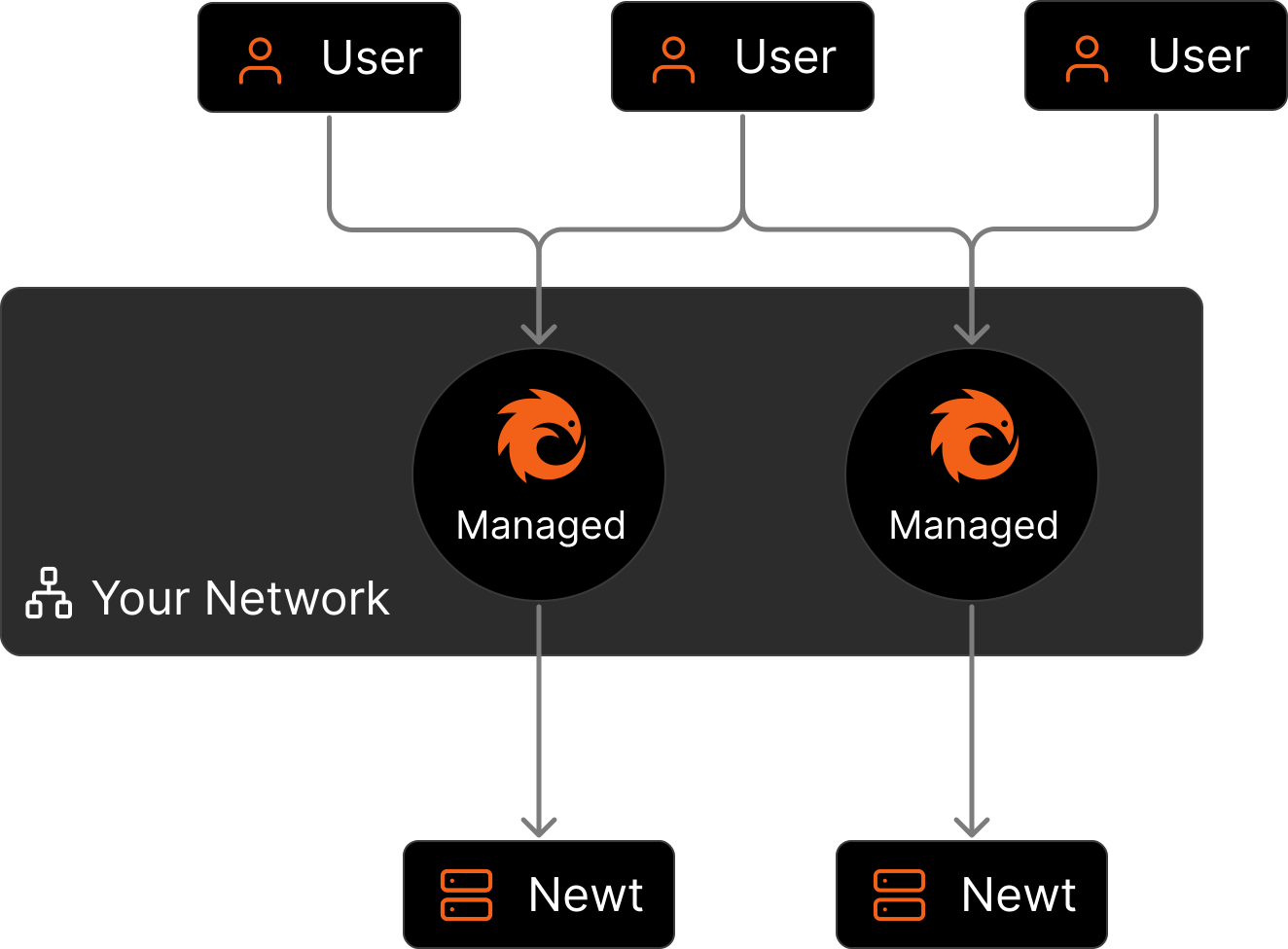 For detailed information about how nodes work and their advantages, see our [nodes](https://docs.digpangolin.com/manage/nodes) documentation. ### Benefits - **High Availability**: Eliminates the complexity of managing high availability while still owning your own infrastructure. - **Less Management Overhead**: While we update the cloud with new features you don't need to touch your nodes unless you want to. - **Automatic updates** The cloud dashboard evolves quickly, so you get new features and bug fixes without having to manually pull new containers every time. - **Cloud failover** If your node goes down, your tunnels can temporarily fail over to our cloud points of presence until you bring it back online. Managed deployment is ideal for organizations that need high availability while maintaining control over their infrastructure and data transit.