

v1.32.0
microsoft/playwrightv1.32.0Mar 22, 2023by aslushnikov
AI Summary
A major feature release introducing the new UI Mode (preview) for testing and debugging.
Key Highlights
- Introduces UI Mode (`--ui`) for exploring, running, and debugging tests with built-in watch mode
- New `page.routeFromHAR()` options `updateMode` and `updateContent`
- Support for chaining locator objects
- New `TestInfo.testId` property
- New `Tracing.startChunk()` option `name`
Breaking Changes
- Component tests: `@playwright/experimental-ct-react` now supports React 18 only; React 16/17 users must use `@playwright/experimental-ct-react17`
New Features
- UI Mode for test exploration and debugging
- HAR file routing with update options
- Locator chaining support
- Test ID generation
- Named tracing chunks
Full Release Notes
## 📣 Introducing UI Mode (preview) <a href="https://www.youtube.com/watch?v=jF0yA-JLQW0"><img src="https://user-images.githubusercontent.com/746130/227044467-b4db82dc-c7fa-40d7-a0c8-8f702581c3b9.png" width=340></a> <a href="https://www.youtube.com/watch?v=jF0yA-JLQW0">Playwright v1.32 updates</a> New UI Mode lets you explore, run and debug tests. Comes with a built-in watch mode. 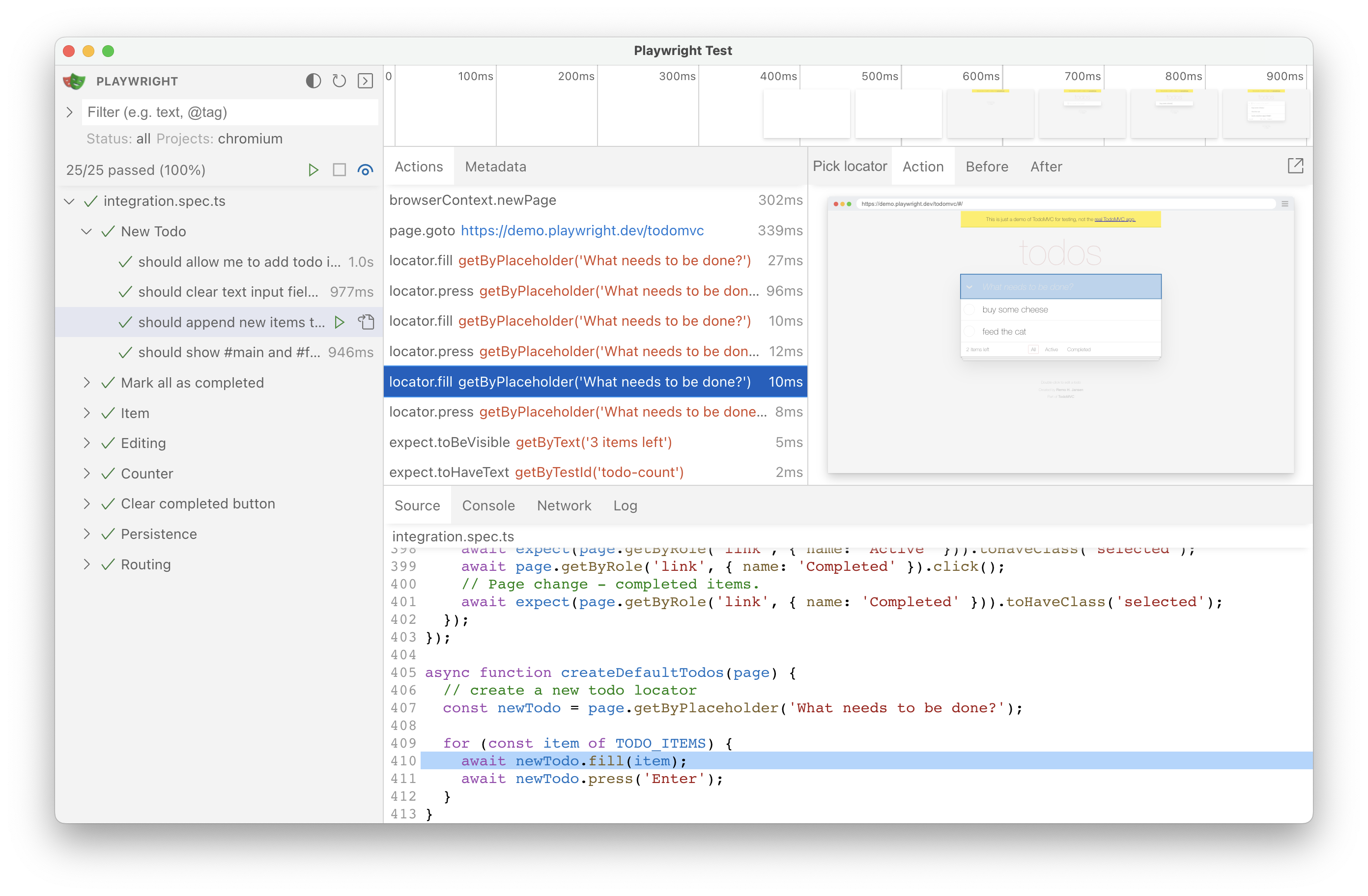 Engage with a new flag `--ui`: ```sh npx playwright test --ui ``` ## New APIs - New options `option: updateMode` and `option: updateContent` in [`page.routeFromHAR()`](https://playwright.dev/docs/api/class-page#page-route-from-har) and [`browserContext.routeFromHAR()`](https://playwright.dev/docs/api/class-browsercontext#browser-context-route-from-har). - Chaining existing locator objects, see [locator docs](https://playwright.dev/docs/locators#chaining-locators) for details. - New property [`TestInfo.testId`](https://playwright.dev/docs/api/class-testinfo#test-info-test-id). - New option `name` in method [`Tracing.startChunk()`](https://playwright.dev/docs/api/class-tracing#tracing-start-chunk). ## ⚠️ Breaking change in component tests Note: **component tests only**, does not affect end-to-end tests. * `@playwright/experimental-ct-react` now supports **React 18 only**. * If you're running component tests with React 16 or 17, please replace `@playwright/experimental-ct-react` with `@playwright/experimental-ct-react17`. ## Browser Versions * Chromium 112.0.5615.29 * Mozilla Firefox 111.0 * WebKit 16.4 This version was also tested against the following stable channels: * Google Chrome 111 * Microsoft Edge 111