

v1.35.0
microsoft/playwrightv1.35.0Jun 8, 2023by aslushnikov
AI Summary
Feature release integrating UI mode into VSCode, enhancing trace viewer capabilities, and introducing screenshot masking options.
Key Highlights
- UI mode is now available in VSCode Playwright extension
- Trace viewer now marks network requests handled by page.route() and browserContext.route()
- New maskColor option for screenshots to change masking color
- New uninstall CLI command to remove browser binaries
- UI mode and trace viewer can now be opened in browser tabs
Breaking Changes
- playwright-core binary renamed; CLI command updated to npx playwright-core install
New Features
- UI Mode in VSCode extension
- Trace viewer network request marking
- maskColor option for screenshots
- uninstall CLI command
- UI mode in browser tabs
Full Release Notes
<a href="https://youtu.be/pJiirfyJwcA"><img src="https://github.com/microsoft/playwright/assets/746130/5a8807c9-928e-4f97-94ab-489c91941ac1" width=340></a>
<a href="https://youtu.be/pJiirfyJwcA">Playwright v1.35 updates</a>
### Highlights
* UI mode is now available in VSCode Playwright extension via a new "Show trace viewer" button:

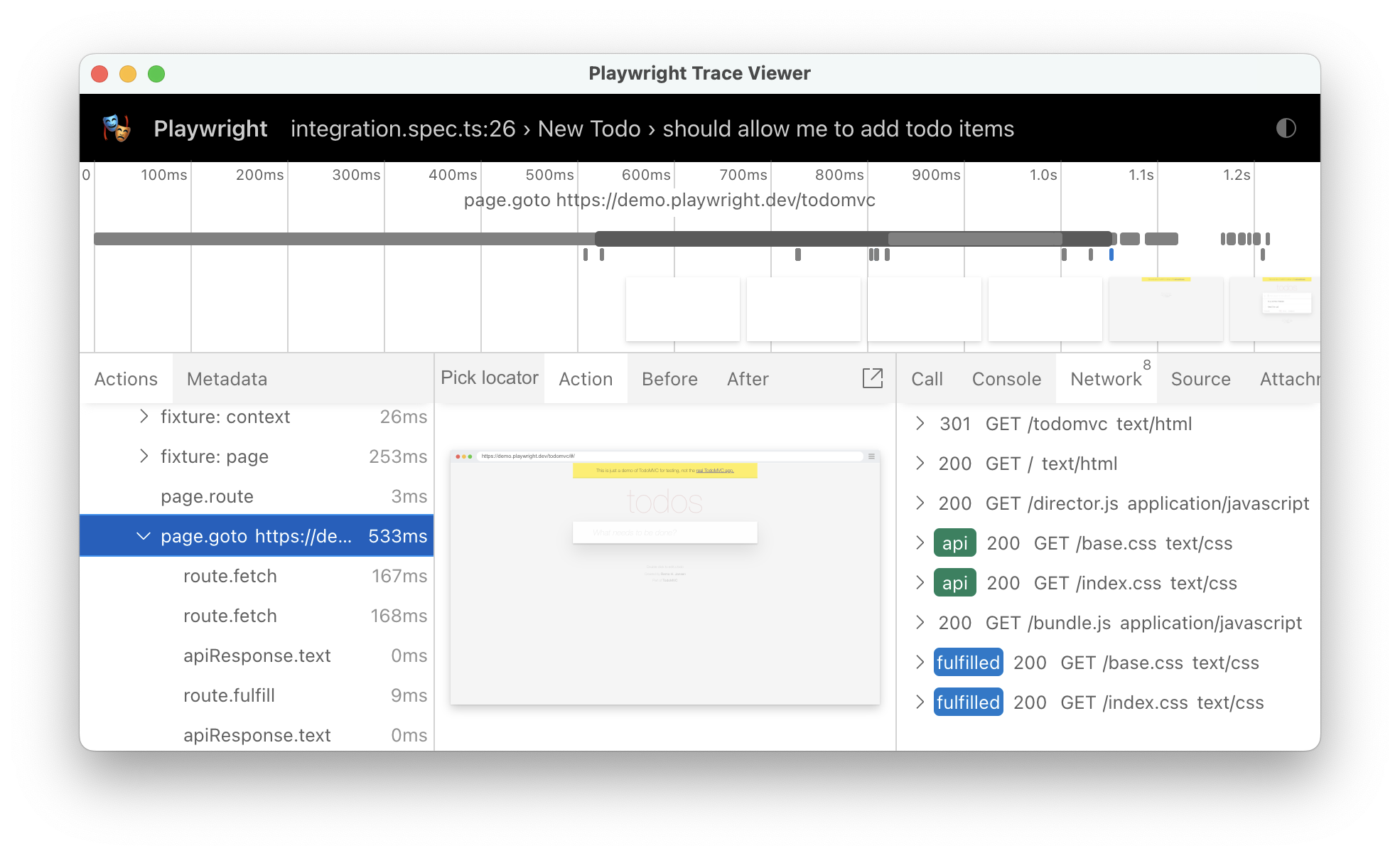
* UI mode and trace viewer mark network requests handled with [`page.route()`](https://playwright.dev/docs/api/class-page#page-route) and [`browserContext.route()`](https://playwright.dev/docs/api/class-browsercontext#browser-context-route) handlers, as well as those issued via the [API testing](https://playwright.dev/docs/api-testing):
* New option `maskColor` for methods [`page.screenshot()`](https://playwright.dev/docs/api/class-page#page-screenshot), [`locator.screenshot()`](https://playwright.dev/docs/api/class-locator#locator-screenshot), [`expect(page).toHaveScreenshot()`](https://playwright.dev/docs/api/class-pageassertions#page-assertions-to-have-screenshot-1) and [`expect(locator).toHaveScreenshot()`](https://playwright.dev/docs/api/class-locatorassertions#locator-assertions-to-have-screenshot-1) to change default masking color:
```js
await page.goto('https://playwright.dev');
await expect(page).toHaveScreenshot({
mask: [page.locator('img')],
maskColor: '#00FF00', // green
});
```
* New `uninstall` CLI command to uninstall browser binaries:
```bash
$ npx playwright uninstall # remove browsers installed by this installation
$ npx playwright uninstall --all # remove all ever-install Playwright browsers
```
* Both UI mode and trace viewer now could be opened in a browser tab:
```bash
$ npx playwright test --ui-port 0 # open UI mode in a tab on a random port
$ npx playwright show-trace --port 0 # open trace viewer in tab on a random port
```
### ⚠️ Breaking changes
* `playwright-core` binary got renamed from `playwright` to `playwright-core`. So if you use `playwright-core` CLI, make sure to update the name:
```bash
$ npx playwright-core install # the new way to install browsers when using playwright-core
```
This change **does not** affect `@playwright/test` and `playwright` package users.
### Browser Versions
* Chromium 115.0.5790.13
* Mozilla Firefox 113.0
* WebKit 16.4
This version was also tested against the following stable channels:
* Google Chrome 114
* Microsoft Edge 114