

v1.43.0
microsoft/playwrightv1.43.0Apr 4, 2024by dgozman
AI Summary
Introduced new APIs for cookie management, trace retention modes, and locator/frame conversions. Enhanced the UI mode with tag filtering and keyboard shortcuts.
Key Highlights
- Cookie clearing now supports domain and name filters
- New 'retain-on-first-failure' trace mode
- Locator and FrameLocator conversion methods added
- UI mode now supports tag filtering and F5 shortcuts
New Features
- browserContext.clearCookies() with filters
- retain-on-first-failure trace mode
- testInfo.tags property
- locator.contentFrame() method
- frameLocator.owner() method
- UI mode tag filtering
- UI mode keyboard shortcuts
Full Release Notes
## New APIs
- Method [browserContext.clearCookies()](https://playwright.dev/docs/api/class-browsercontext#browser-context-clear-cookies) now supports filters to remove only some cookies.
```js
// Clear all cookies.
await context.clearCookies();
// New: clear cookies with a particular name.
await context.clearCookies({ name: 'session-id' });
// New: clear cookies for a particular domain.
await context.clearCookies({ domain: 'my-origin.com' });
```
- New mode `retain-on-first-failure` for [testOptions.trace](https://playwright.dev/docs/api/class-testoptions#test-options-trace). In this mode, trace is recorded for the first run of each test, but not for retires. When test run fails, the trace file is retained, otherwise it is removed.
```js title=playwright.config.ts
import { defineConfig } from '@playwright/test';
export default defineConfig({
use: {
trace: 'retain-on-first-failure',
},
});
```
- New property [testInfo.tags](https://playwright.dev/docs/api/class-testinfo#test-info-tags) exposes test tags during test execution.
```js
test('example', async ({ page }) => {
console.log(test.info().tags);
});
```
- New method [locator.contentFrame()](https://playwright.dev/docs/api/class-locator#locator-content-frame) converts a `Locator` object to a `FrameLocator`. This can be useful when you have a `Locator` object obtained somewhere, and later on would like to interact with the content inside the frame.
```js
const locator = page.locator('iframe[name="embedded"]');
// ...
const frameLocator = locator.contentFrame();
await frameLocator.getByRole('button').click();
```
- New method [frameLocator.owner()](https://playwright.dev/docs/api/class-framelocator#frame-locator-owner) converts a `FrameLocator` object to a `Locator`. This can be useful when you have a `FrameLocator` object obtained somewhere, and later on would like to interact with the `iframe` element.
```js
const frameLocator = page.frameLocator('iframe[name="embedded"]');
// ...
const locator = frameLocator.owner();
await expect(locator).toBeVisible();
```
## UI Mode Updates
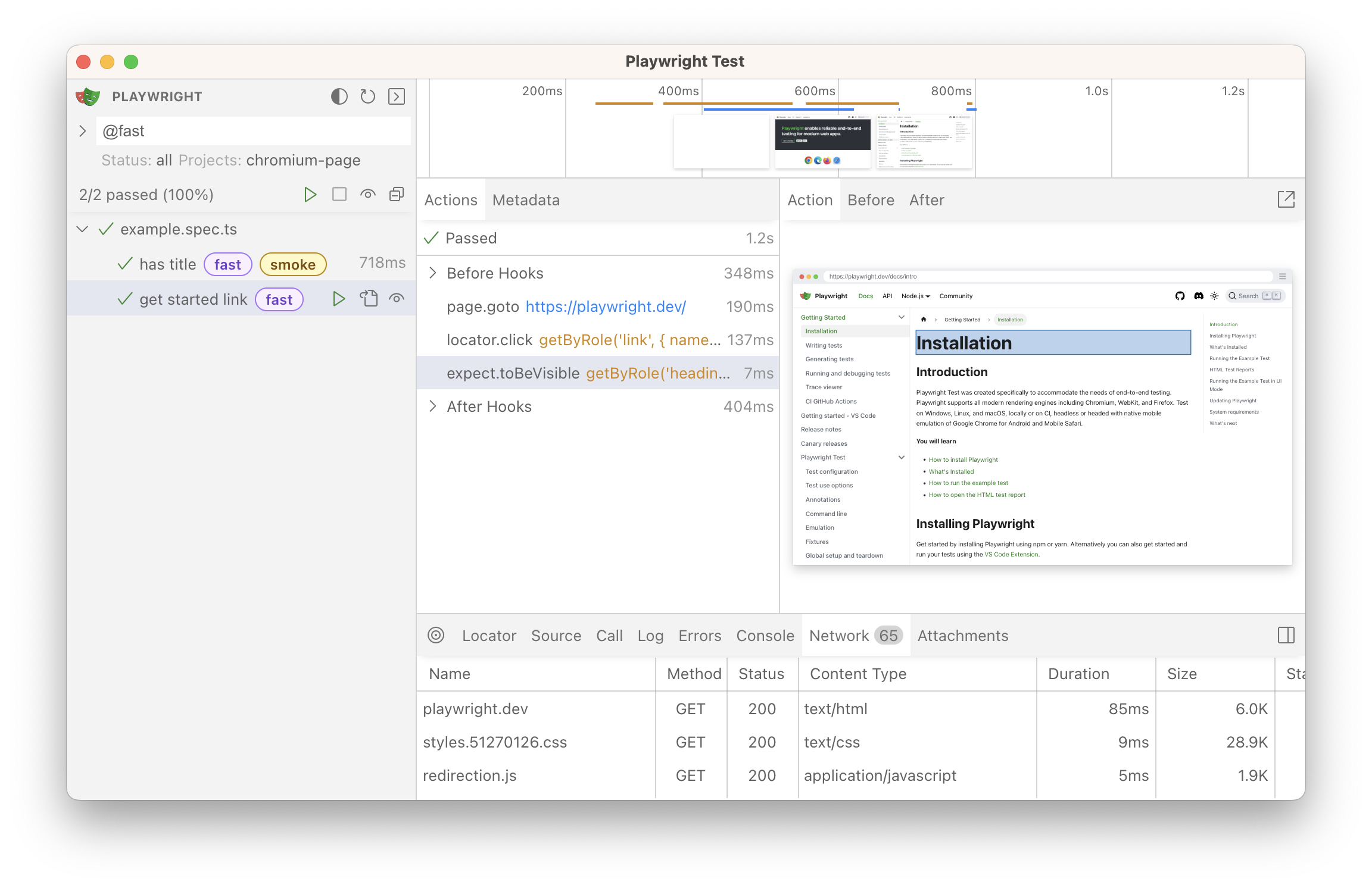
* See tags in the test list.
* Filter by tags by typing `@fast` or clicking on the tag itself.
* New shortcuts:
- <kbd>F5</kbd> to run tests.
- <kbd>Shift</kbd> <kbd>F5</kbd> to stop running tests.
- <kbd>Ctrl</kbd> <kbd>`</kbd> to toggle test output.
## Browser Versions
* Chromium 124.0.6367.29
* Mozilla Firefox 124.0
* WebKit 17.4
This version was also tested against the following stable channels:
* Google Chrome 123
* Microsoft Edge 123