

v0.1.0-alpha.3
niri-wm/niriv0.1.0-alpha.3Jan 7, 2024by YaLTeR
AI Summary
This alpha release introduces borders for windows and refactors the configuration structure into a `layout { }` node. It also adds multi-GPU support and fullscreen backdrop rendering.
Key Highlights
- Config refactor: Layout settings moved into `layout { }` node.
- Window borders support (always visible).
- Fullscreen backdrop for windows smaller than the monitor.
- Multi-GPU support for monitors on secondary GPUs.
Breaking Changes
- Settings for `focus-ring`, `preset-column-widths`, `default-column-width`, `gaps`, and `struts` must be moved inside a `layout { }` node.
New Features
- Window borders configuration.
- Fullscreen backdrop rendering.
- Multi-GPU support.
- Actions to focus/move columns to first/last positions.
- Input flag to disable power key handling.
- Debug flag to disable cursor plane.
Full Release Notes
### Config breaking change
Settings for `focus-ring`, `preset-column-widths`, `default-column-width`, `gaps`, `struts` moved into a new `layout { }` node.
```
layout {
focus-ring { /* ... */ }
preset-column-widths { /* ... */ }
default-column-width { /* ... */ }
gaps 8
struts { /* ... */ }
}
```
### Multi-GPU support
Monitors plugged into secondary GPUs will now light up and work. This is particularly important for hybrid laptops with an integrated and a discrete GPU, where for example a monitor may "plug into" the dGPU while the primary device is the iGPU.
Additionally, direct scan-out will now work in more cases across GPUs (i.e. a dGPU client on an iGPU monitor).
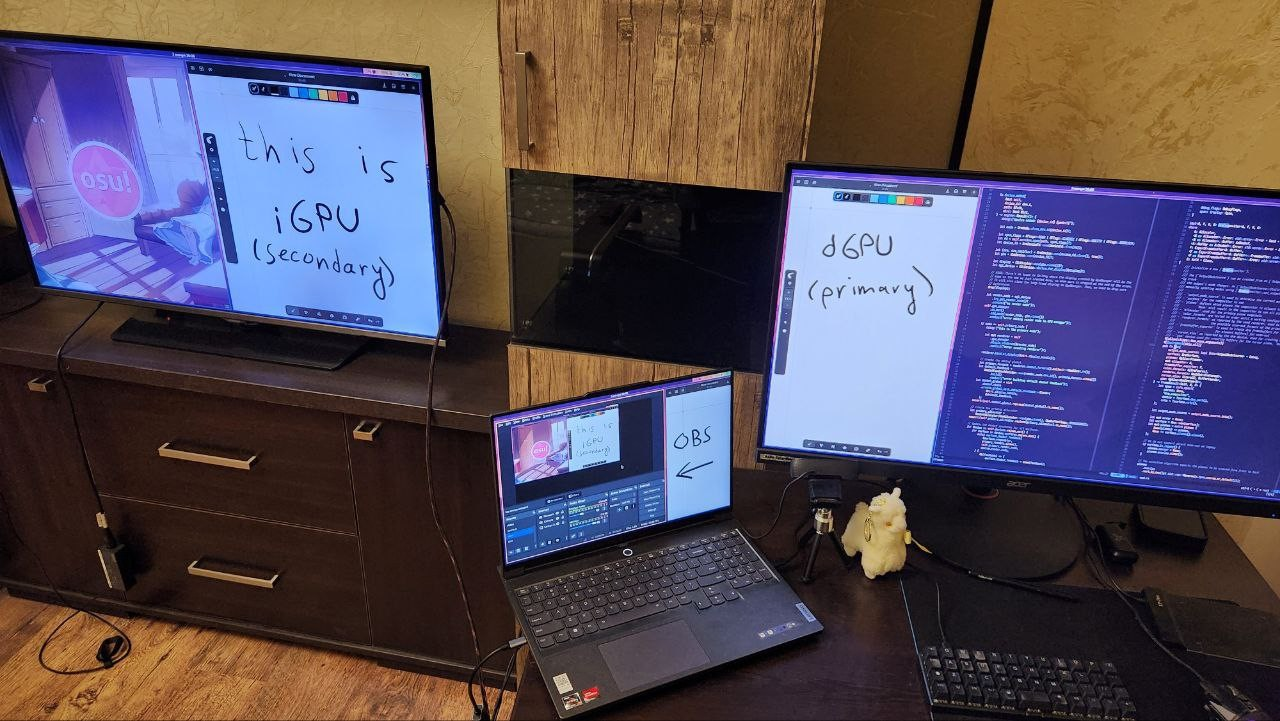
Niri uses the default GPU for rendering, the same as any other GL client. You can force niri to use a different GPU with a new debug setting which works similarly to the `WLR_RENDER_DRM_DEVICE` environment variable from wlroots:
```
debug {
render-drm-device "/dev/dri/renderD129"
}
```
### Borders
You can now add borders to windows with a new setting:
```
layout {
border {
// The settings are the same as for the focus ring.
// If you enable the border, you probably want to disable the focus ring.
// off
width 4
active-color 255 200 127 255
inactive-color 80 80 80 255
}
}
```
In contrast to the focus ring, borders are always visible, even on unfocused windows.

### Fullscreen backdrop
Fullscreen windows smaller than the monitor now have a monitor-sized black backdrop, as expected by xdg-shell. This makes all fullscreen windows consistent in how they look, while keeping the PaperWM-like property that they mostly behave like a regular column that you can scroll out of view if you want.

### More improvements in this release
- Added a `focus-column-{first,last}` actions that focus the leftmost/rightmost column on the workspace, bound to <kbd>Mod</kbd><kbd>Home</kbd>/<kbd>End</kbd> by default.
- Added a `move-column-to-{first,last}` actions that move the focused column to the leftmost/rightmost position on the workspace, bound to <kbd>Mod</kbd><kbd>Ctrl</kbd><kbd>Home</kbd>/<kbd>End</kbd> by default.
- Added an `input { disable-power-key-handling }` config flag to prevent niri from taking over the power button handling (which makes it sleep instead of power off). You can use this flag if you configure the power button elsewhere, i.e. in `logind.conf`.
- Windows on unfocused monitors now always display as unfocused.
- When `prefer-no-csd` is unset (the default), niri is now more insistent on client-side decorations. This makes the alacritty 0.13 use CSD in this case for example.
- Added a `debug { disable-cursor-plane }` config flag if you're having cursor rendering issues.
- Enabled EGL support for clients in the winit backend (when running niri as a nested window). On Fedora with recent Mesa this makes it so you can run GL clients inside nested niri again.
- The `toggle-debug-tint` action, bound to <kbd>Mod</kbd><kbd>Ctrl</kbd><kbd>Shift</kbd><kbd>T</kbd> by default, will now redraw the screen immediately.
> [!CAUTION]
> This is an alpha tag. There are known bugs and missing features. Don't be surprised if there's a breaking config change in the future.
Please check the [README](https://github.com/YaLTeR/niri/blob/main/README.md) for building and installation instructions. Also, if you're on Fedora, I've got a [COPR](https://copr.fedorainfracloud.org/coprs/yalter/niri/). NixOS users, check out https://github.com/sodiboo/niri-flake.