

v0.1.3
niri-wm/niriv0.1.3Mar 9, 2024by YaLTeR
AI Summary
This release introduces touchpad gestures, spring animations, and basic touchscreen support. It also adds gradient borders, wlr-screencopy support for tools like grim, and improves system integration with systemd scopes.
Key Highlights
- Touchpad gestures with inertial scrolling and spring animations.
- Basic touchscreen support added to the compositor.
- Gradient borders using CSS-like syntax for focus rings.
- wlr-screencopy support (v1) for screenshot tools like grim.
- Transitional systemd scopes for spawned applications.
Breaking Changes
- Stricter config validation: `default-column-width` and binds now error if multiple children are present.
- Auto-detection of session via `NOTIFY_SOCKET` replaced by the `niri --session` flag.
- Packagers may need to update startup commands for non-systemd environments.
New Features
- Horizontal touchpad gestures.
- Spring animations for UI elements.
- Window rules for `open-maximized` and `open-fullscreen`.
- Environment variable configuration section.
- wp-viewporter and xdg-foreign protocols.
Full Release Notes
Niri is a scrollable-tiling Wayland compositor. Windows are arranged in columns on an infinite strip going to the right. Opening a new window never causes existing windows to resize.
Here are the improvements from the last release.
> [!NOTE]
> Packagers: if you're not using systemd and the `niri-session` script, you may need to change your niri startup command to `niri --session`. Please read below on the changes for environments without systemd.
>
> Also, please consider including the wp-viewporter revert: 40cec34aa4a7f99ab12b30cba1a0ee83a706a413 to fix a mouse input bug with Chromium and Electron apps.
## Touchpad gestures
I grew annoyed enough with the lack of a horizontal touchpad gesture in niri, so I spent several days working on the gestures. I tried three different horizontal gesture behaviors, and the one I landed on does a fairly good job of moving the windows where you intended.
I also made many overall improvements to both the vertical and the horizontal gestures to make them *feel* very good. They are now inertial, meaning that a short flick is enough to take you to the next workspace, as the gesture will account for the speed of your fingers. Vertical gesture has rubberbanding at the edges, indicating that you can't go any further. Finally, both gestures use spring animations when releasing fingers, which feel natural as they also take the finger speed into account. If you swipe with enough force, you'll even get a small bounce at the edge!
https://github.com/YaLTeR/niri/assets/1794388/946a910e-9bec-4cd1-a923-4a9421707515
Thanks goes to the maintainers of [libadwaita](https://gitlab.gnome.org/GNOME/libadwaita) since that's where I copied lots of the code and numeric values from.
## Spring animations
As part of the gesture work, niri now supports spring animations. These are physics-based animations that are especially well suited for gestures, but feel good on their own too. Based on the spring configuration, they can optionally give small bounces and oscillations.
I made three of the four default animations to use springs. If you had custom animation settings in your config, comment them out to give springs a try! Also, check the default config for a [more detailed explanation](https://github.com/YaLTeR/niri/blob/v0.1.3/resources/default-config.kdl#L268-L293) and examples on how to set up spring animations.
https://github.com/YaLTeR/niri/assets/1794388/29c70f51-1c5e-4367-83c4-92707692a33e
## Touch support
@cmeissl added basic touchscreen support to niri. Thanks!
<figure>
<img src="https://github.com/YaLTeR/niri/assets/1794388/8236205f-d296-40e9-8291-b991104e6279">
<caption><div align="center"><i>Dramatic reenactment (this laptop doesn't have a touchscreen).</i></div></caption>
</figure>
## Gradient borders
Focus ring and borders can now use a linear gradient instead of a solid color!
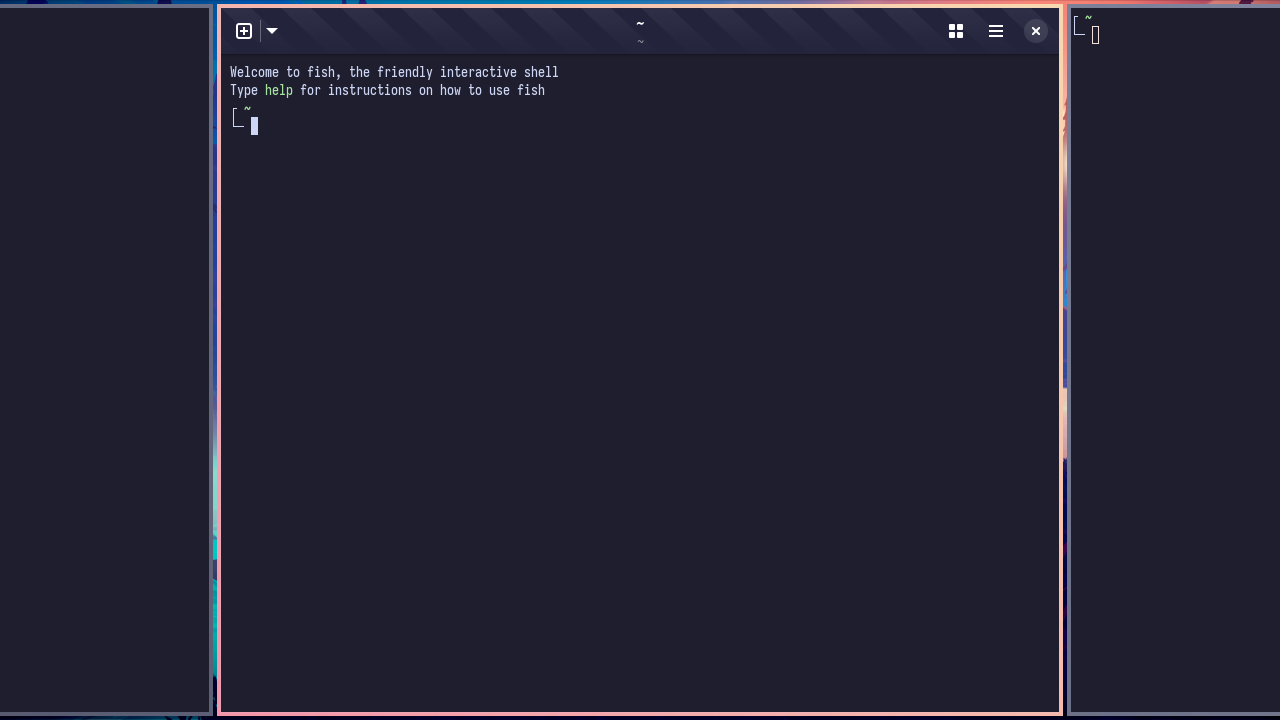
This is how you can set it up:
```
layout {
border {
active-gradient from="#f38ba8" to="#f9e2af" angle=45 relative-to="workspace-view"
inactive-gradient from="#585b70" to="#7f849c" angle=45 relative-to="workspace-view"
}
}
```
Colors can use several CSS-like notations, and the gradient itself is rendered like CSS `linear-gradient(angle, from, to)`. You can use some CSS gradient generator, like [this one](https://www.css-gradient.com/), to get a gradient you like, then copy the values into the niri config.
Also, gradients can be relative to windows individually (the default), or to the whole view of the workspace. It's easier to explain visually:
| Default | `relative-to="workspace-view"` |
| --- | --- |
|  |  |
By the way, regular colors can also now be written with CSS-like notations. The old four-number way is now deprecated.
```
// catppuccin-mocha Sapphire
active-color "#74c7ec"
// catppuccin-mocha Surface2
inactive-color "#585b70"
```
## wlr-screencopy
While niri supports xdg-desktop-portal screencasting and has a built-in screenshot UI, these are not very well suited for taking programmatic screenshots (and the current screenshot portal API isn't very good either). So, in this release, niri implements wlr-screencopy *version 1* (not 3). Now you can take screenshots with [grim](https://git.sr.ht/~emersion/grim).
Screen *recording* tools based on wlr-screencopy will need version 3, so they won't work for now. (The screencast portal is better for this anyway; for example, it leaves frame pacing entirely to the compositor, where it belongs.) Version 1 should be sufficient for any screenshot tool; if a screenshot tool complains that it needs version 3 then it likely needs a simple patch to avoid requesting version 3 if unavailable.
Like other security-sensitive protocols, wlr-screencopy is not available to sandboxed clients with a security context (such as Flatpaks).
<table><tr><td>
<img src="https://github.com/YaLTeR/niri/assets/1794388/124b6643-97f0-4adb-83bb-f42ec8ac5057">
<br>
<div align="center"><i>Finally, all three of my outputs on a single screenshot.</i></div>
</td></tr></table>
Thanks to @sodiboo for implementing wlr-screencopy support!
## Frame timing fixes
I fixed several issues in the presentation time handling and frame callback tracking logic.
- Frame callbacks were sometimes sent ~1 frame later than they should've been, meaning that clients had much less time to render.
- With specific timing it was possible for frame callbacks to stop getting sent to certain surfaces, causing a window to stop redrawing until something else updates the screen.
- Zero presentation time from DRM (which can happen on some drivers) sometimes resulted in a panic.
## Stricter config validation
Due to the ease of use in [knuffel](http://lib.rs/knuffel), the KDL parsing library we use in niri, some nodes technically accepted multiple children, despite only expecting one. Specifically, `default-column-width {}` and binds. Also, you could write multiple binds to the same key combination, which is similarly not supported.
This has been fixed to cause a config validation error. While technically a config-breaking change, it's more of a bug fix, since before all these extra nodes that you could write were ignored. Therefore I considered it fine to include in a minor niri version bump.
Thanks @sodiboo for implementing this validation!
## Refactored window creation flow
I reworked the window creation flow and tracking of unmapped windows in niri to make it more robust and less "all over the place". As part of this:
- With borders enabled, `default-column-width {}` (unset, the app picks its own) caused the app to shrink a bit right after it appeared. This wasn't really noticeable, but it resulted in a smaller window size than what the app wanted. It is now fixed.
- Corrected `default-column-width { fixed N; }` similarly not taking borders into account, resulting in a smaller window than the specified N.
- Added support for apps requesting a specific fullscreen monitor before they first appear (`mpv --fs-screen=N` will now work).
- Added `open-maximized true` window rule.
- Added `open-fullscreen true/false` window rule. Setting it to `true` will fullscreen the window upon opening, and setting it to `false` will deny the window from fullscreening upon opening.
- Some windows can request fullscreen *after* they are initially configured, but *before* they are first shown on screen. In this case `open-fullscreen false` will not work, because these window rules apply at the initial configure. So far I only saw `mpv --fs` do this, so it's not a big problem (you can just remove the mpv flag).
## Systemd scopes
When niri runs applications it will now put them into transient systemd scopes. One concrete benefit is that when an application uses too much RAM and systemd-oomd kills it, niri won't go down alongside the app, so the rest of your session will stay intact.
Many other tools (like Flatpak, tmux, or systemd itself) already do this for the commands they spawn, so niri joins this established practice.
```
┌ ~
└─ systemctl --user status
● sparklingbrook
State: running
Units: 444 loaded (incl. loaded aliases)
Jobs: 0 queued
Failed: 0 units
Since: Mon 2024-03-04 10:25:20 +04; 4 days ago
systemd: 254.9-1.fc39
CGroup: /user.slice/user-1000.slice/user@1000.service
├─app.slice
│ ├─app-niri-alacritty-1672431.scope
│ │ ├─1672431 alacritty
│ │ ├─1672446 /usr/bin/fish
│ │ └─1672578 systemctl --user status --no-pager
│ ├─app-niri-fuzzel-1672466.scope
│ │ └─1672468 /var/home/yalter/stuff/blender-4.0.2-linux-x64/blender
<...>
├─session.slice
│ ├─niri.service
│ │ └─1663138 /usr/bin/niri --session
<...>
```
Also, since the `niri.service` scope now only contains niri itself, I have moved it into `session.slice`, a slice for important services such as the compositor.
## Running without systemd
I've made it easier to run niri in environments without systemd.
- Added a new, enabled by default, feature `systemd` which gates calls to the systemd D-Bus API. Currently, this includes starting transient scopes and `systemctl import-environment`.
- Niri now sets `XDG_CURRENT_DESKTOP` and `XDG_SESSION_TYPE` in the main binary, rather than in the `niri-session` script.
- Added a `niri --session` flag for running niri as the main session instance, which means that it will import environment variables globally into systemd and D-Bus, and start D-Bus services. This flag replaces auto-detection based on the presence of the `NOTIFY_SOCKET` variable.
- Added a `dinit` feature that runs `dinitctl setenv` to import environment, and added ready notifications through `NOTIFY_FD` environment variable (thanks @metent).
So, if you package niri:
- Check if you need to call `niri --session` instead of `niri`.
- Make sure you compile with the `systemd` feature if needed.
- Compile with the `dinit` feature if your distribution uses [dinit](https://davmac.org/projects/dinit/).
## Other improvements in this release
- Fixed a Smithay crash when a client sets a buffer scale of 0. The client is now correctly terminated with a protocol error.
- Fixed a crash when parsing the EDID of certain monitors.
- Fixed screen locking when monitors are powered off.
- Fixed windows disappearing when requesting to be fullscreen on a different output than they were displayed on.
- Fixed empty workspaces sometimes not getting cleaned up during the workspace switch gesture.
- Fixed screen resolution changes not always triggering output repositioning, which could result in overlapping outputs (which manifested as mouse clicks seemingly not always working).
- Fixed `toggle-debug-tint` desynchronizing for newly connected outputs.
- Commented out the default bind for `toggle-debug-tint`.
- `spawn` and `spawn-at-startup` will now expand `~` to the home directory in the command name, similarly to how `screenshot-path` does it. In the command arguments `~` will not be expanded.
- Added the [`environment {}`](https://github.com/YaLTeR/niri/blob/v0.1.3/resources/default-config.kdl#L213-L220) config section where you can control the environment variables that niri sets for the commands it spawns.
- Implemented the wp-viewporter protocol. This makes `Xwayland -fullscreen` work (that flag makes it emulate a specific screen resolution for the clients inside).
- Implemented the xdg-foreign protocol, which allows tracking dialog parent relationships in more cases, which will be more useful in the future.
- Overlays like the exit confirmation dialog are no longer dismissed by a mouse button release, which means that a Waybar module that calls `niri msg action quit` on click will now work as expected.
- Clarified in the default config how workspace indices work.
- Changed several `error!` log messages to `warn!` for consistency. In niri, `error!` always indicates a bug in our code. If something can happen without a bug in niri, then it should be a `warn!`.