

v1.86.16
spider-rs/spiderv1.86.16Mar 19, 2024by j-mendez
AI Summary
Introduces dynamic browser interaction capabilities using custom scripts powered by OpenAI and adds support for crawling Cold Fusion files.
Key Highlights
- Added OpenAI Chrome driver for custom scripts
- Added Cold Fusion file crawling support
- Added screenshot configuration options
- Added network idle waiting logic
New Features
- OpenAI Chrome driver
- Cold Fusion support
- Screenshot configuration
Full Release Notes
## What's Changed
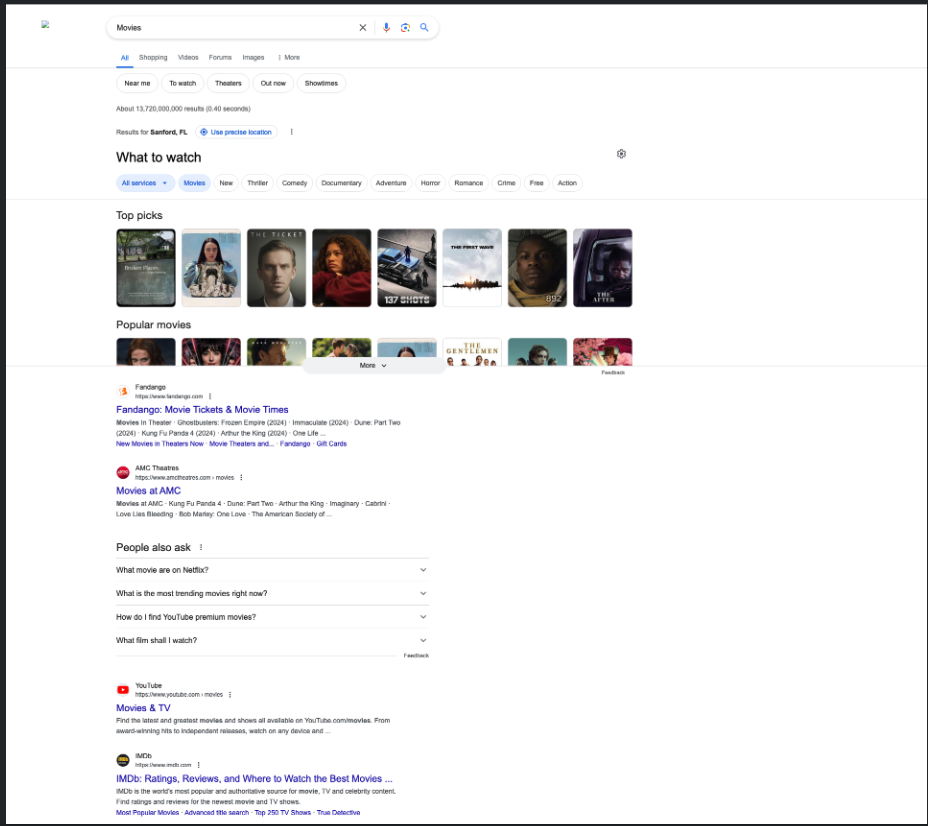
You can now dynamically drive the browser with custom scripts using OpenAI.
Make sure to set the `OPENAI_API_KEY` env variable or pass it in to the program.
* Openai/chrome driver by @j-mendez in https://github.com/spider-rs/spider/pull/174
* chore(page): add cold fusion file crawling support
```rust
extern crate spider;
use spider::configuration::{GPTConfigs, WaitForIdleNetwork};
use spider::tokio;
use spider::website::Website;
#[tokio::main]
async fn main() {
let _ = tokio::fs::create_dir_all("./storage/").await;
let screenshot_params =
spider::configuration::ScreenshotParams::new(Default::default(), Some(true), Some(true));
let screenshot_config =
spider::configuration::ScreenShotConfig::new(screenshot_params, true, true, None);
let mut website: Website = Website::new("https://google.com")
.with_chrome_intercept(true, true)
.with_wait_for_idle_network(Some(WaitForIdleNetwork::new(Some(Duration::from_secs(30)))))
.with_screenshot(Some(screenshot_config))
.with_limit(1)
.with_openai(Some(GPTConfigs::new(
"gpt-4-1106-preview",
"Search for Movies",
500,
)))
.build()
.unwrap();
let mut rx2 = website.subscribe(16).unwrap();
tokio::spawn(async move {
while let Ok(page) = rx2.recv().await {
println!("{}\n{}", page.get_url(), page.get_html());
}
});
website.crawl().await;
}
```
The output of the custom script from the AI:

The screenshot of the page output:
**Full Changelog**: https://github.com/spider-rs/spider/compare/v1.85.4...v1.86.16